
Issue
I wanted to Implement Spotlight feature in my app, as the Spotlight library is Android specific and I didn't knew how to access platform specific libraries from the core Forms project, @Jason recommended to use DependencyService and @Colex - MSFT helped in its implementation. There are few small things, which aren't working as expected.
I've basically this 3 buttons (1st on top-left, 2nd on top-right, 3rd on bottom-center).
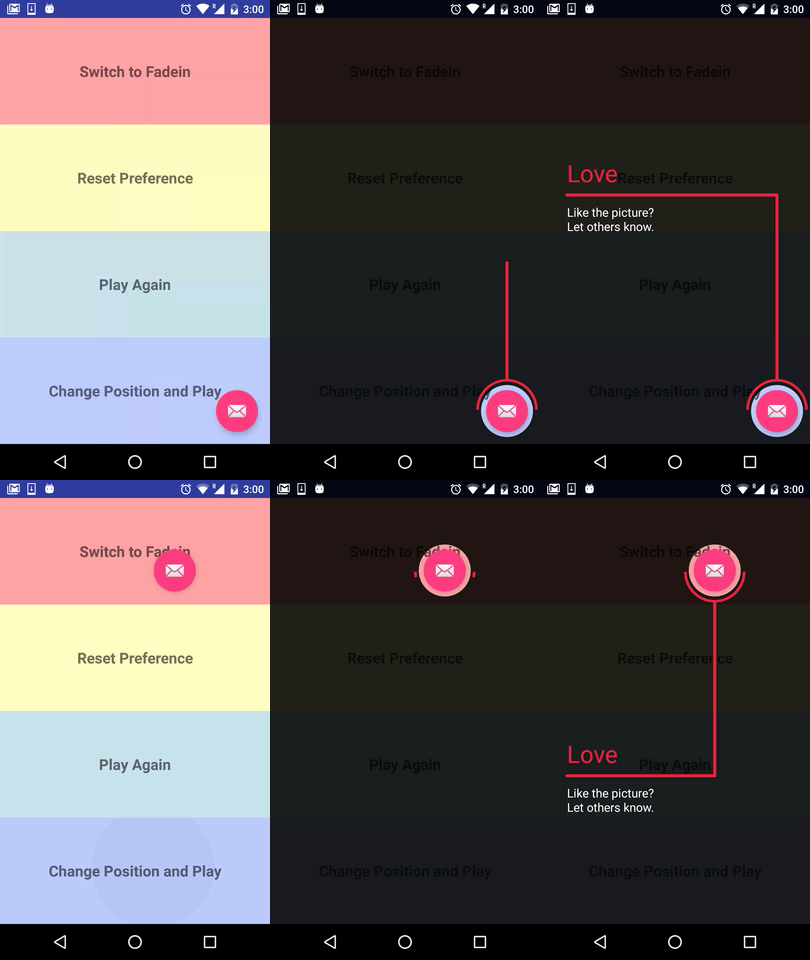
The line animation has to start from the component (button), like this Preview from Spotlight library, but in my app they are starting from the top-left (all of them).
I want that when 1st button's spotlight is fade out, then the 2nd button's spotlight should fade in and when it's fade out, the third button's spotlight should fade in. But what's happening now is that when the 1st button's spotlight is fade out, the 2nd button's spotlight is already faded in (already enabled), and hence no animation (line starts from the component (button) and the text appears).
Droid\Control\SpotLightService.cs
[assembly: Xamarin.Forms.Dependency(typeof(SpotLightService))]
namespace CustomRenderer.Droid.Control
{
    public class SpotLightService : ISpotLight
    {
        private bool isRevealEnabled_FirstButton_SpotLight = true;
        private bool isRevealEnabled_SecondButton_SpotLight = true;
        private bool isRevealEnabled_ThirdButton_SpotLight = true;
        private SpotlightView FirstButton_SpotLight;
        private SpotlightView SecondButton_SpotLight;
        private SpotlightView ThirdButton_SpotLight;

        public void ShowSpotLight_FirstButton(Xamarin.Forms.View view, string usageId)
        {
            FirstButton_SpotLight = new SpotlightView.Builder(MainActivity.Instance)
                .IntroAnimationDuration(400)
                .EnableRevealAnimation(isRevealEnabled_FirstButton_SpotLight)
                .PerformClick(true)
                .FadeinTextDuration(400)
                .HeadingTvColor(Android.Graphics.Color.ParseColor("#eb273f"))
                .HeadingTvSize(32)
                .HeadingTvText("First Button")
                .SubHeadingTvColor(Android.Graphics.Color.ParseColor("#eb273f"))
                .SubHeadingTvSize(16)
                .SubHeadingTvText("Lorem ipsum dolor sit amet, consectetur adipiscing elit")
                .MaskColor(Android.Graphics.Color.ParseColor("#dc000000"))
                .Target(ConvertFormsToNative(view))
                .LineAnimDuration(400)
                .LineAndArcColor(Android.Graphics.Color.ParseColor("#eb273f"))
                .DismissOnTouch(true)
                .DismissOnBackPress(true)
                .EnableDismissAfterShown(true)
                .UsageId(usageId)
                .ShowTargetArc(true)
                .Show();
        }

        public void ShowSpotLight_SecondButton(Xamarin.Forms.View view, string usageId)
        {
            SecondButton_SpotLight = new SpotlightView.Builder(MainActivity.Instance)
                .IntroAnimationDuration(400)
                .EnableRevealAnimation(isRevealEnabled_SecondButton_SpotLight)
                .PerformClick(true)
                .FadeinTextDuration(400)
                .HeadingTvColor(Android.Graphics.Color.ParseColor("#eb273f"))
                .HeadingTvSize(32)
                .HeadingTvText("Second Button")
                .SubHeadingTvColor(Android.Graphics.Color.ParseColor("#eb273f"))
                .SubHeadingTvSize(16)
                .SubHeadingTvText("Sed do eiusmod tempor incididunt ut labore eta")
                .MaskColor(Android.Graphics.Color.ParseColor("#dc000000"))
                .Target(ConvertFormsToNative(view))
                .LineAnimDuration(400)
                .LineAndArcColor(Android.Graphics.Color.ParseColor("#eb273f"))
                .DismissOnTouch(true)
                .DismissOnBackPress(true)
                .EnableDismissAfterShown(true)
                .UsageId(usageId)
                .ShowTargetArc(true)
                .Show();
        }

        public void ShowSpotLight_ThirdButton(Xamarin.Forms.View view, string usageId)
        {
            ThirdButton_SpotLight = new SpotlightView.Builder(MainActivity.Instance)
                .IntroAnimationDuration(400)
                .EnableRevealAnimation(isRevealEnabled_ThirdButton_SpotLight)
                .PerformClick(true)
                .FadeinTextDuration(400)
                .HeadingTvColor(Android.Graphics.Color.ParseColor("#eb273f"))
                .HeadingTvSize(32)
                .HeadingTvText("Third Button")
                .SubHeadingTvColor(Android.Graphics.Color.ParseColor("#eb273f"))
                .SubHeadingTvSize(16)
                .SubHeadingTvText("Ut enim ad minim veniam, quis nostrud exercitation")
                .MaskColor(Android.Graphics.Color.ParseColor("#dc000000"))
                .Target(ConvertFormsToNative(view))
                .LineAnimDuration(400)
                .LineAndArcColor(Android.Graphics.Color.ParseColor("#eb273f"))
                .DismissOnTouch(true)
                .DismissOnBackPress(true)
                .EnableDismissAfterShown(true)
                .UsageId(usageId)
                .ShowTargetArc(true)
                .Show();
        }

        public View ConvertFormsToNative(Xamarin.Forms.View view)
        {
            var vRenderer = Platform.CreateRendererWithContext(view, MainActivity.Instance);
            var Androidview = vRenderer.View;
            vRenderer.Tracker.UpdateLayout();

            var size = view.Bounds;
            var layoutParams = new ViewGroup.LayoutParams((int)size.Width, (int)size.Height);
            Androidview.LayoutParameters = layoutParams;
            view.Layout(size);
            Androidview.Layout((int)size.X, (int)size.Y, (int)view.WidthRequest, (int)view.HeightRequest);
            Androidview.SetBackgroundColor(Android.Graphics.Color.Red);
            return Androidview;
        }
    }
}
MainPage.xml.cs
public partial class MainPage : ContentPage
{
    public MainPage()
    {
        InitializeComponent();

        LayoutChanged += FirstButton_SpotLight;
        LayoutChanged += SecondButton_SpotLight;
        LayoutChanged += ThirdButton_SpotLight;
    }


    bool isShown_FirstButton_SpotLight = false;
    private void FirstButton_SpotLight(object sender, EventArgs e)
    {
        if (!isShown_FirstButton_SpotLight)
        {
            DependencyService.Get<ISpotLight>().ShowSpotLight_FirstButton(FirstButton, "FirstButton");
            isShown_FirstButton_SpotLight = true;
        }
    }


    bool isShown_SecondButton_SpotLight = false;
    private void SecondButton_SpotLight(object sender, EventArgs e)
    {
        if (!isShown_SecondButton_SpotLight)
        {
            DependencyService.Get<ISpotLight>().ShowSpotLight_SecondButton(SecondButton, "SecondButton");
            isShown_SecondButton_SpotLight = true;
        }
    }

    bool isShown_ThirdButton_SpotLight = false;
    private void ThirdButton_SpotLight(object sender, EventArgs e)
    {
        if (!isShown_ThirdButton_SpotLight)
        {
            DependencyService.Get<ISpotLight>().ShowSpotLight_ThirdButton(ThirdButton, "ThirdButton");
            isShown_ThirdButton_SpotLight = true;
        }
    }
}
Solution
As json mentioned, I realized that it is true , the function ConvertFormsToNative does not return the real native element .
The only workaround for your requirement is
Create a custom renderer for the whole Page , and add the control in native(android) project.
For details you can refer to Customizing a ContentPage .
- Create custom renderer for Page .
[assembly: ExportRenderer(typeof(Page1), typeof(MainPageRenderer))]
namespace CustomRenderer.Droid
{
    class MainPageRenderer : PageRenderer
    {
        private Android.Views.View view;
        private Android.Widget.Button button1;
        private Android.Widget.Button button2;
        private Android.Widget.Button button3;
        public MainPageRenderer(Context context) : base(context)
        {
        }

        protected override void OnElementChanged(ElementChangedEventArgs<Page> e)
        {
            base.OnElementChanged(e);

            if (e.OldElement != null || Element == null)
            {
                return;
            }


            view = MainActivity.Instance.LayoutInflater.Inflate(Resource.Layout.MyPage, this, false);
            AddView(view);


            view.Click += View_Click;

            button1 = view.FindViewById<Android.Widget.Button>(Resource.Id.firstButton);
            button2 = view.FindViewById<Android.Widget.Button>(Resource.Id.secondButton);
            button3 = view.FindViewById<Android.Widget.Button>(Resource.Id.thirdButton);


        }

        bool isShown_FirstButton_SpotLight = false;
        bool isShown_SecondButton_SpotLight = false;
        bool isShown_ThirdButton_SpotLight = false;
        private void View_Click(object sender, EventArgs e)
        {
            if (!isShown_FirstButton_SpotLight)
            {
                show(button1 ,"First Button" ,"Lorem ipsum dolor sit amet, consectetur adipiscing elit", "FirstButton");
                isShown_FirstButton_SpotLight = true;
                return;
            }
            if (!isShown_SecondButton_SpotLight)
            {
                show(button2,"Second Button", "Sed do eiusmod tempor incididunt ut labore eta", "SecondButton");
                isShown_SecondButton_SpotLight = true;
                return;
            }
            if (!isShown_ThirdButton_SpotLight)
            {
                show(button3,"Third Button", "Ut enim ad minim veniam, quis nostrud exercitation", "ThirdButton");
                isShown_ThirdButton_SpotLight = true;
                return;
            }
        }

        void show(Android.Views.View view, string title, string subTitle, string usageId)
        {
            new SpotlightView.Builder(MainActivity.Instance)
                .IntroAnimationDuration(400)
                .EnableRevealAnimation(true)
                .PerformClick(true)
                .FadeinTextDuration(400)
                .HeadingTvColor(Android.Graphics.Color.ParseColor("#eb273f"))
                .HeadingTvSize(32)
                .HeadingTvText(title)
                .SubHeadingTvColor(Android.Graphics.Color.ParseColor("#eb273f"))
                .SubHeadingTvSize(16)
                .SubHeadingTvText(subTitle)
                .MaskColor(Android.Graphics.Color.ParseColor("#dc000000"))
                .Target(view)
                .LineAnimDuration(400)
                .LineAndArcColor(Android.Graphics.Color.ParseColor("#eb273f"))
                .DismissOnTouch(true)
                .DismissOnBackPress(true)
                .EnableDismissAfterShown(true)
                .UsageId(usageId)
                .ShowTargetArc(true)
                .Show();
        }

        protected override void OnLayout(bool changed, int l, int t, int r, int b)
        {
            base.OnLayout(changed, l, t, r, b);

            var msw = MeasureSpec.MakeMeasureSpec(r - l, MeasureSpecMode.Exactly);
            var msh = MeasureSpec.MakeMeasureSpec(b - t, MeasureSpecMode.Exactly);

            view.Measure(msw, msh);
            view.Layout(0, 0, r - l, b - t);
        }
    }
}
- Create a xml and place it in folder
Resources/layoutin android project .
<?xml version="1.0" encoding="utf-8"?>
<LinearLayout xmlns:android="http://schemas.android.com/apk/res/android"
    android:orientation="vertical"
    android:layout_width="match_parent"
    android:layout_height="match_parent">


    <Button
        android:id="@+id/firstButton"
        android:layout_width="50dp"
        android:layout_height="50dp"
        android:layout_marginLeft="50dp"
        android:layout_marginTop="50dp"
        android:text="First"
        android:background="#00ff00"/>

    <Button
        android:id="@+id/secondButton"
        android:layout_width="50dp"
        android:layout_height="50dp"
        android:layout_marginLeft="100dp"
        android:layout_marginTop="100dp"
        android:text="Second"
        android:background="#ff0000"/>

    <Button
        android:id="@+id/thirdButton"
        android:layout_width="50dp"
        android:layout_height="50dp"
        android:layout_marginLeft="150dp"
        android:layout_marginTop="150dp"
        android:text="Third"
        android:background="#0000ff"/>
</LinearLayout>


Little thing
Click white space area to show the Spotlight in turn.
The plugin only supports circle spotlight, you can make the control round ,check here .
Answered By - ColeX - MSFT


0 comments:
Post a Comment
Note: Only a member of this blog may post a comment.