
Issue
I am trying to create an app with two toolbars on top and a specific collapsing/expanding behaviour on scrolling. See the mockup to get a deeper understanding of what I'm trying to achieve:

I already found this StackOverflow question that is trying to achieve for about the same, and the response is hinting towards using a CollapsingToolbarLayout and just using another <Toolbar /> instead of the usual <ImageView />, but I tried around and could not get any close to the desired result.
My current xml layout:
<androidx.coordinatorlayout.widget.CoordinatorLayout
    xmlns:android="http://schemas.android.com/apk/res/android"
    xmlns:tools="http://schemas.android.com/tools"
    xmlns:app="http://schemas.android.com/apk/res-auto"
    android:id="@+id/mainContainer"
    android:layout_width="match_parent"
    android:layout_height="match_parent"
    android:fitsSystemWindows="true"
    tools:context=".MainActivity">

    <com.google.android.material.appbar.AppBarLayout
        android:id="@+id/appbar"
        android:layout_width="match_parent"
        android:layout_height="wrap_content">

        <com.google.android.material.appbar.CollapsingToolbarLayout
            android:layout_width="match_parent"
            android:layout_height="wrap_content"
            app:layout_scrollFlags="scroll|exitUntilCollapsed">

            <androidx.appcompat.widget.Toolbar
                android:layout_width="match_parent"
                android:layout_height="?attr/actionBarSize"
                app:title="01/01/1999"
                app:layout_collapseMode="parallax" />

            <androidx.appcompat.widget.Toolbar
                android:id="@+id/toolbar"
                android:layout_width="match_parent"
                android:layout_height="?attr/actionBarSize"
                app:title="Title"
                app:layout_collapseMode="pin" />

        </com.google.android.material.appbar.CollapsingToolbarLayout>

    </com.google.android.material.appbar.AppBarLayout>

    <androidx.core.widget.NestedScrollView
        android:layout_width="match_parent"
        android:layout_height="wrap_content"
        app:layout_behavior="@string/appbar_scrolling_view_behavior">

        <TextView
            android:layout_width="match_parent"
            android:layout_height="wrap_content"
            android:text="@string/placeholder"/>

    </androidx.core.widget.NestedScrollView>

</androidx.coordinatorlayout.widget.CoordinatorLayout>
And the corresponding activity code:
@Override
protected void onCreate(Bundle savedInstanceState) {
    super.onCreate(savedInstanceState);
    setContentView(R.layout.activity_main);
    Toolbar toolbar = findViewById(R.id.toolbar);
    setSupportActionBar(toolbar);
}
I am using a NoActionBar theme. If I run this configuration, there is just one Toolbar displayed, nothing can be seen from the second Toolbar or the CollapsingToolbarLayout.
Huge thanks to anyone who is trying to help.
Solution
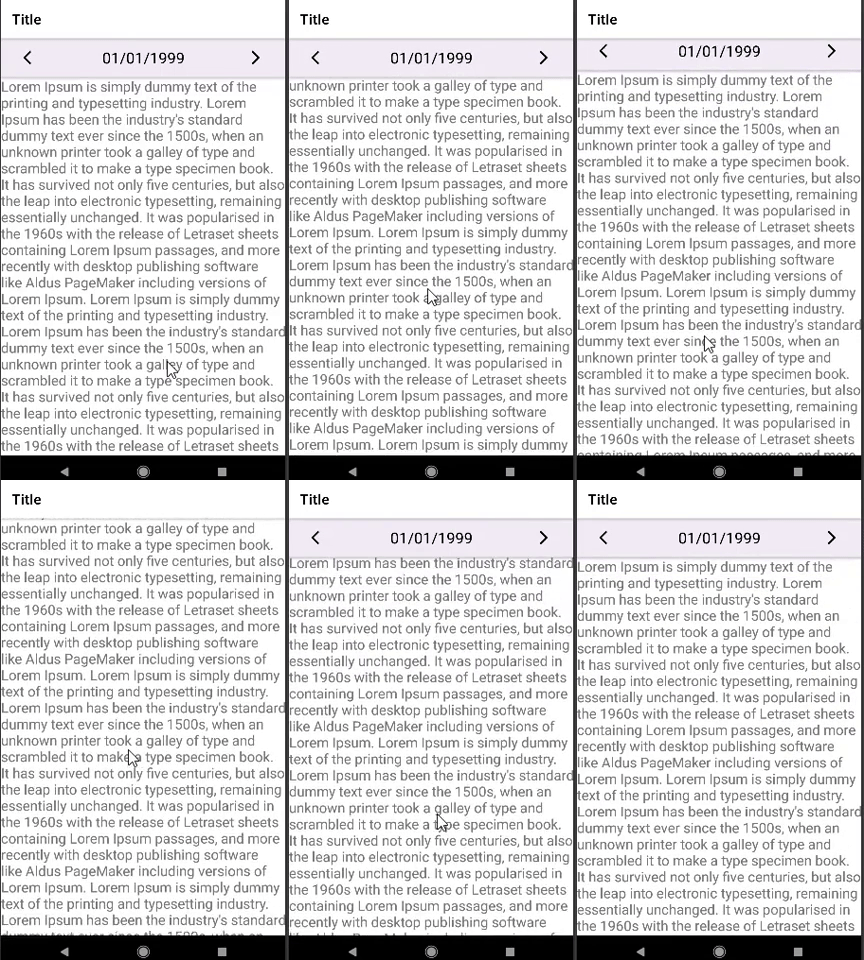
You could wrap the CoordinatorLayout into a another ViewGroup and add the main Toolbar into this new root layout instead. This will avoid the confusion of the app:layout_collapseMode="pin" to the main toolbar.
So now the entire layout hierarchy would be:
<ConstraintLayout>
    <AppBarLayout>
        <Toolbar>  <<<<<<<<<<<<<<<<<<< main toolbar

    <CoordinatorLayout>
        <AppBarLayout>
            <CollapsingToolbarLayout>
                <Toolbar>  <<<<<<<<<<<<<<<<<<< second toolbar
        <NestedScrollView>
            <TextView>
Then to fix the collapsing behavior like you want you need to change the scrolling flags of the CollapsingToolbarLayout to "scroll|enterAlways" instead of "scroll|exitUntilCollapsed". This will make the toolBar always enter off the top screen.
And build the layout of the second Toolbar with a normal ViewGroup inside of it; here I'm using ConstraintLayout:
<?xml version="1.0" encoding="utf-8"?>
<androidx.constraintlayout.widget.ConstraintLayout xmlns:android="http://schemas.android.com/apk/res/android"
    xmlns:app="http://schemas.android.com/apk/res-auto"
    android:layout_width="match_parent"
    android:layout_height="match_parent">

    <com.google.android.material.appbar.AppBarLayout xmlns:tools="http://schemas.android.com/tools"
        android:id="@+id/appbar_layout"
        android:layout_width="match_parent"
        android:layout_height="wrap_content"
        android:theme="@style/ThemeOverlay.AppCompat.Dark.ActionBar"
        app:layout_constraintTop_toTopOf="parent"
        app:popupTheme="@style/ThemeOverlay.AppCompat.Light"
        tools:visibility="visible">

        <androidx.appcompat.widget.Toolbar
            android:id="@+id/toolbar"
            android:layout_width="match_parent"
            android:layout_height="?actionBarSize"
            android:background="@color/white"
            app:popupTheme="@style/ThemeOverlay.AppCompat.Light"
            app:title="Title"
            app:titleTextColor="@color/black" />

    </com.google.android.material.appbar.AppBarLayout>

    <androidx.coordinatorlayout.widget.CoordinatorLayout
        android:layout_width="match_parent"
        android:layout_height="0dp"
        app:layout_constraintBottom_toBottomOf="parent"
        app:layout_constraintTop_toBottomOf="@+id/appbar_layout">

        <com.google.android.material.appbar.AppBarLayout
            android:id="@+id/appBarLayout"
            android:layout_width="match_parent"
            android:layout_height="wrap_content"
            android:background="@android:color/transparent"
            android:fitsSystemWindows="true"
            android:theme="@style/ThemeOverlay.AppCompat.Dark.ActionBar"
            app:popupTheme="@style/ThemeOverlay.AppCompat.Light">

            <com.google.android.material.appbar.CollapsingToolbarLayout
                android:id="@+id/collapsingToolbar"
                android:layout_width="match_parent"
                android:layout_height="wrap_content"
                app:layout_scrollFlags="scroll|enterAlways">

                <androidx.appcompat.widget.Toolbar
                    android:layout_width="match_parent"
                    android:layout_height="?attr/actionBarSize"
                    app:contentInsetStart="0dp">

                    <androidx.constraintlayout.widget.ConstraintLayout
                        android:layout_width="match_parent"
                        android:layout_height="match_parent"
                        android:background="#F2ECF6"
                        android:paddingHorizontal="32dp"
                        app:layout_collapseMode="parallax">

                        <ImageButton
                            android:id="@+id/left_arrow"
                            android:layout_width="wrap_content"
                            android:layout_height="wrap_content"
                            android:background="?android:attr/actionBarItemBackground"
                            app:layout_constraintBottom_toBottomOf="parent"
                            app:layout_constraintStart_toStartOf="parent"
                            app:layout_constraintTop_toTopOf="parent"
                            app:srcCompat="@drawable/ic_baseline_arrow_back_ios_24"
                            app:tint="@color/black" />

                        <ImageButton
                            android:id="@+id/right_arrow"
                            android:layout_width="wrap_content"
                            android:layout_height="wrap_content"
                            android:background="?android:attr/actionBarItemBackground"
                            app:layout_constraintBottom_toBottomOf="parent"
                            app:layout_constraintEnd_toEndOf="parent"
                            app:layout_constraintTop_toTopOf="parent"
                            app:srcCompat="@drawable/ic_baseline_arrow_forward_ios_24"
                            app:tint="@color/black" />

                        <TextView
                            android:layout_width="0dp"
                            android:layout_height="0dp"
                            android:gravity="center"
                            android:text="01/01/1999"
                            android:textColor="@color/black"
                            android:textSize="22sp"
                            app:layout_constraintBottom_toBottomOf="parent"
                            app:layout_constraintEnd_toStartOf="@+id/right_arrow"
                            app:layout_constraintStart_toEndOf="@+id/left_arrow"
                            app:layout_constraintTop_toTopOf="parent" />

                    </androidx.constraintlayout.widget.ConstraintLayout>
                </androidx.appcompat.widget.Toolbar>

            </com.google.android.material.appbar.CollapsingToolbarLayout>


        </com.google.android.material.appbar.AppBarLayout>

        <androidx.core.widget.NestedScrollView
            android:layout_width="match_parent"
            android:layout_height="match_parent"
            app:layout_behavior="@string/appbar_scrolling_view_behavior">

            <TextView
                android:layout_width="wrap_content"
                android:layout_height="wrap_content"
                android:text="@string/placeholder"
                android:textSize="20sp" />

        </androidx.core.widget.NestedScrollView>

    </androidx.coordinatorlayout.widget.CoordinatorLayout>

</androidx.constraintlayout.widget.ConstraintLayout>
Answered By - Zain


0 comments:
Post a Comment
Note: Only a member of this blog may post a comment.